Table of Contents
Technical Account Module - Technical Assets
Overview
A technical asset represents a specific application, information system, or technological unit that requires its own access permissions to function and communicate with its environment (other applications and systems). By itself, it is not a specific account; rather, it is the owner and umbrella element for so-called technical accounts (service accounts).
Examples:
- An integration platform (e.g., the IdM itself) needs to access various systems (AD, HR system, SAP, etc.).
- An HR portal needs to access AD to check which employees are active, and the payroll system to check remaining vacation balances.
- A monitoring tool requires access to the monitored systems.
The primary reason for registering technical assets is to ensure that every technical account within the organization has a clearly defined owner and does not remain anonymous. Therefore, we define two key human roles for each technical asset:
- Technical Asset Guarantor: A person from the business or management side who bears overall functional and compliance responsibility for the given asset. The Guarantor approves permissions for individual technical accounts under the given technical asset.
- Technical Asset Holder: A technical specialist who actually works with asset accounts in practice. In the IdM, the Holder securely retrieves passwords, configures them on target systems, and creates requests for roles that grant the permissions the technical account requires for its intended use.
Thanks to this Person → Technical Asset → Technical Accounts linkage, we can precisely audit at any time who is responsible for which technology and who manages its access rights, which is also crucial from a regulatory standpoint to ensure the organization's compliance with legislative requirements, such as the NIS2 Directive.
Purpose
- Centralize management of technical accounts under logical asset groupings
- Enable role-based access control for asset-related operations
- Provide audit capabilities for compliance requirements
- Support notifications via NOTIFY event
Entities
ER Diagram
┌──────────────────┐      ┌────────────────┐
│ TechnicalAccount │◄─ ─ ─│ TechnicalAsset │
└──────────────────┘      └────────────────┘
                                   │
                                   │      ┌─────────────────────────┐
                                   ├─────►│ TechnicalAssetGuarantor │◄────────┐
                                   │      └─────────────────────────┘         │     ┌─────────────┐
                                   │                                          ├─────│ IdmIdentity │
                                   │      ┌──────────────────────┐            │     └─────────────┘
                                   ├─────►│ TechnicalAssetHolder │◄───────────┘
                                   │      └──────────────────────┘
                                   │
                                   │      ┌─────────────────────────────┐
                                   ├─────►│ TechnicalAssetGuarantorRole │◄────┐
                                   │      └─────────────────────────────┘     │     ┌─────────┐
                                   │                                          ├─────│ IdmRole │
                                   │      ┌──────────────────────────┐        │     └─────────┘
                                   └─────►│ TechnicalAssetHolderRole │◄───────┘
                                          └──────────────────────────┘
TechnicalAccount
The technical account has been extended with an optional attribute specifying which technical asset it belongs to. If a technical asset becomes disabled, the technical accounts belonging to it will become disabled as well. Note that this doesn't work in reverse - if a technical asset becomes enabled again, its technical accounts will stay disabled until set to enabled manually.
Key Attributes
| Attribute | Type | Description |
|---|---|---|
| technicalAsset | UUID | optional attribute specifying which technical asset the technical account belongs to |
Evaluators
| Evaluator | Type | Description | Attributes |
|---|---|---|---|
| TechnicalAccountByTechnicalAssetGuarantorEvaluator | Regular | Returns technical accounts where the logged user is a guarantor of the parent technical asset - either directly by identity or indirectly by role. Technical accounts without an assigned technical asset are never matched by this evaluator. | No attributes |
| TechnicalAccountByTechnicalAssetHolderEvaluator | Regular | Returns technical accounts where the logged user is a holder of the parent technical asset - either directly by identity or indirectly by role. Technical accounts without an assigned technical asset are never matched by this evaluator. | No attributes |
| TechnicalAccountByTechnicalAssetTransitiveEvaluator | Transitive | Returns technical accounts where the logged user has access to the parent technical asset. Permissions are transitively derived from the technical asset the technical account belongs to. Technical accounts without an assigned technical asset are never matched by this evaluator. | Transfer permissions - a list of permissions to be transferred from a technical asset to its technical accounts; if the list is empty, all permissions held by the user for the given technical asset will be transferred to its technical accounts |
Technical account agenda
The overview of technical accounts can be accessed via the "Systems" and "Accounts" agendas in the main menu. The technical accounts in this agenda can be filtered by the technical asset they belong to, as well as by the rest of their properties.

Technical account creation with/without technical asset
When creating a technical account via the wizard, the first step allows you to select the technical asset to which the technical account belongs. By default, an administrator can create a technical account without selecting a technical asset, whereas all other users are required to fill it in. This behavior can be modified using two configuration properties:
idm.pub.tech.techAccountWizard.accountWithoutAssetForAdmin: Setting this to false enforces that even administrator must select a technical asset.idm.pub.tech.techAccountWizard.accountWithoutAssetRoles: By populating this property with role UUIDs (multiple UUIDs can be comma-separated), users with any of these roles assigned will be allowed to create technical accounts without specifying a technical asset.
TechnicalAsset
The primary entity representing a technical asset that can contain multiple technical accounts.
Key Attributes
| Attribute | Type | Description |
|---|---|---|
| id | UUID | primary identifier |
| code | String | unique business identifier of the asset |
| name | String | asset name |
| description | String | asset description |
| disabled | Boolean | flag indicating whether the asset is disabled |
| pam | Boolean | flag indicating whether the asset is managed under Privileged Access Management (PAM) |
| zone | String | security zone in which the application represented by the asset resides; see Asset assignment validation |
| externalId | String | identifier assigned by an external system for integration purposes |
| externalCode | String | code from an external system |
| validFrom | LocalDate | validity start date |
| validTill | LocalDate | validity end date |
Permissions
| Permission | Description |
|---|---|
| ADMIN | all permissions |
| COUNT | permission to retrieve the count of entities |
| AUTOCOMPLETE | permission to display the entity in autocomplete suggestions |
| READ | permission to read the entity |
| CREATE | permission to create the entity |
| UPDATE | permission to edit entity attributes |
| DELETE | permission to delete the entity |
| SETTOTECHNICALACCOUNT | permission to assign a technical account to the given Technical Asset |
Evaluators
| Evaluator | Type | Description | Attributes |
|---|---|---|---|
| TechnicalAssetByGuarantorEvaluator | Regular | Returns technical assets where the logged user is a guarantor - either directly by identity or indirectly by role. | No attributes |
| TechnicalAssetByHolderEvaluator | Regular | Returns technical assets where the logged user is a holder - either directly by identity or indirectly by role. | No attributes |
Asset assignment validation
Assigning a technical asset to a technical account is subject to a validation that answers a single question: may this technical asset be assigned to this technical account? The rule is not hardcoded - it is a Groovy script referenced from configuration, so each deployment decides what makes a pair valid.
A technical account references its technical asset and is linked to an AccAccount through TechnicalAccountAccount. The script always receives this pair - the technical asset and the linked AccAccount.
Zone
The delivered rule compares the zone attribute, which exists on both sides of the pair:
- Zone of the technical asset - the security zone in which the application represented by the technical asset resides.
- Zone of the technical account - the security zone in which the application the technical account belongs to resides. The value itself is stored on the linked
AccAccount.
Configuration
# Code of the script deciding whether a technical asset may be assigned to a technical account.
# Default: permissive script, nothing is enforced.
idm.sec.tech.accountAssetAssignment.checkScript=techAccountAssetAssignmentAllowAll
Two scripts are delivered with the module:
| Script code | Behaviour |
|---|---|
techAccountAssetAssignmentAllowAll | Always returns `true` - any technical asset may be assigned to any technical account. This is the default value of the property, so nothing is enforced out of the box. |
techAccountAssetAssignmentZoneMatch | Accepts the pair when the asset has no zone, or when the asset zone equals the account zone. |
To enforce matching zones, set the property to techAccountAssetAssignmentZoneMatch. To implement a different rule, create your own script and put its code into the property.
Script contract
The script is evaluated as a system script and receives two parameters:
| Parameter | Type | Description |
|---|---|---|
technicalAsset | TechnicalAssetDto | the technical asset the technical account is to have; can be `null` when the asset is being removed |
accAccount | AccAccountDto | the account linked to the technical account; always filled in |
The script must return a Boolean - `true` when the pair is acceptable, `false` when it is not. Any other return value is reported as TECH\_ACCOUNT\_ASSET\_ASSIGNMENT\_SCRIPT\_RESULT\_NOT\_BOOLEAN.
Example script
The script below is the zone rule delivered as techAccountAssetAssignmentZoneMatch. Use it as a starting point for your own rule.
import com.google.common.base.Strings;

// No asset, or asset without zone - no constraint
if (technicalAsset == null || Strings.isNullOrEmpty(technicalAsset.getZone())) {
	return true;
}

String accountZone = accAccount == null ? null : accAccount.getZone();
return technicalAsset.getZone().equals(accountZone);
Create the script in the Scripts agenda with category SYSTEM and parameters technicalAsset, accAccount. Classes used in the body have to be allowed for the script - the example above needs com.google.common.base.Strings, eu.bcvsolutions.idm.tech.model.dto.TechnicalAssetDto and eu.bcvsolutions.idm.acc.dto.AccAccountDto.
When the validation runs
The check is enforced on save of the involved entities, not only through the wizard or the CSV import:
- change of an
AccAccountthat is linked to a technical account - change of the technical asset on a technical account
- creation of the link between a technical account and an
AccAccount - change of a technical asset that is assigned to technical accounts
When the pair is rejected, the operation fails with result code TECH\_ACCOUNT\_ASSET\_ASSIGNMENT\_REJECTED:
Technical asset [asset-code] cannot be assigned to technical account [account-code] (account [account-uid]) - rejected by the assignment check script [techAccountAssetAssignmentZoneMatch].
CSV import
The technical account CSV import validates the target state of every row before it writes anything, using the same script. A row whose resulting pair would be rejected fails already in the pre-save validation, the rest of the batch continues, and a dry run reports the same verdict.
Tier
The tier attribute on AccAccount is an informational, free-form value. Neither of the delivered scripts takes it into account, so by default it imposes no constraint - it is used for classification and table display only. A custom script can use it.
TechnicalAssetGuarantor
Represents direct assignment of an identity as guarantor for a technical asset.
Key Attributes
| Attribute | Type | Description |
|---|---|---|
| id | UUID | primary identifier |
| externalId | String | identifier assigned by an external system for integration purposes |
| technicalAsset | UUID | id of the technical asset to be guaranted |
| guarantor | UUID | id of the user to be guarantor |
Permissions
| Permission | Description |
|---|---|
| ADMIN | all permissions |
| COUNT | permission to retrieve the count of entities |
| AUTOCOMPLETE | permission to display the entity in autocomplete suggestions |
| READ | permission to read the entity |
| CREATE | permission to create the entity |
| UPDATE | permission to edit entity attributes |
| DELETE | permission to delete the entity |
Evaluators
| Evaluator | Type | Description | Attributes |
|---|---|---|---|
| TechnicalAssetGuarantorByTechnicalAssetGuarantorEvaluator | Regular | Returns technical asset guarantors where the logged user is a guarantor of that technical asset - either directly by identity or indirectly by role. | No attributes |
| TechnicalAssetGuarantorByTechnicalAssetHolderEvaluator | Regular | Returns technical asset guarantors where the logged user is a holder of that technical asset - either directly by identity or indirectly by role. | No attributes |
| TechnicalAssetGuarantorByTechnicalAssetTransitiveEvaluator | Transitive | Returns technical asset guarantors where the logged user has access to the parent technical asset. Permissions are transitively derived from the technical asset the technical asset guarantor belongs to. | Transfer permissions - a list of permissions to be transferred from a technical asset to its guarantors; if the list is empty, all permissions held by the user for the given technical asset will be transferred to its guarantors |
TechnicalAssetGuarantorRole
Represents the assignment of a role to a technical asset, where granting this role to a user designates them as a guarantor of that asset
Key Attributes
| Attribute | Type | Description |
|---|---|---|
| id | UUID | primary identifier |
| externalId | String | identifier assigned by an external system for integration purposes |
| technicalAsset | UUID | id of the technical asset to be guaranted |
| role | UUID | id of the role which, when assigned to a user, makes them a guarantor |
Permissions
| Permission | Description |
|---|---|
| ADMIN | all permissions |
| COUNT | permission to retrieve the count of entities |
| AUTOCOMPLETE | permission to display the entity in autocomplete suggestions |
| READ | permission to read the entity |
| CREATE | permission to create the entity |
| UPDATE | permission to edit entity attributes |
| DELETE | permission to delete the entity |
Evaluators
| Evaluator | Type | Description | Attributes |
|---|---|---|---|
| TechnicalAssetGuarantorRoleByTechnicalAssetGuarantorEvaluator | Regular | Returns technical asset guarantor roles where the logged user is a guarantor of that technical asset - either directly by identity or indirectly by role. | No attributes |
| TechnicalAssetGuarantorRoleByTechnicalAssetHolderEvaluator | Regular | Returns technical asset guarantor roles where the logged user is a holder of that technical asset - either directly by identity or indirectly by role. | No attributes |
| TechnicalAssetGuarantorRoleByTechnicalAssetTransitiveEvaluator | Transitive | Returns technical asset guarantor roles where the logged user has access to the parent technical asset. Permissions are transitively derived from the technical asset the technical asset guarantor role belongs to. | Transfer permissions - a list of permissions to be transferred from a technical asset to its guarantor roles; if the list is empty, all permissions held by the user for the given technical asset will be transferred to its guarantor roles |
TechnicalAssetHolder
Represents direct assignment of an identity as holder for a technical asset.
Key Attributes
| Attribute | Type | Description |
|---|---|---|
| id | UUID | primary identifier |
| externalId | String | identifier assigned by an external system for integration purposes |
| technicalAsset | UUID | id of the technical asset to be managed |
| holder | UUID | id of the user to be holder |
Permissions
| Permission | Description |
|---|---|
| ADMIN | all permissions |
| COUNT | permission to retrieve the count of entities |
| AUTOCOMPLETE | permission to display the entity in autocomplete suggestions |
| READ | permission to read the entity |
| CREATE | permission to create the entity |
| UPDATE | permission to edit entity attributes |
| DELETE | permission to delete the entity |
Evaluators
| Evaluator | Type | Description | Attributes |
|---|---|---|---|
| TechnicalAssetHolderByTechnicalAssetGuarantorEvaluator | Regular | Returns technical asset holders where the logged user is a guarantor of that technical asset - either directly by identity or indirectly by role. | No attributes |
| TechnicalAssetHolderByTechnicalAssetHolderEvaluator | Regular | Returns technical asset holders where the logged user is a holder of that technical asset - either directly by identity or indirectly by role. | No attributes |
| TechnicalAssetHolderByTechnicalAssetTransitiveEvaluator | Transitive | Returns technical asset holders where the logged user has access to the parent technical asset. Permissions are transitively derived from the technical asset the technical asset holder belongs to. | Transfer permissions - a list of permissions to be transferred from a technical asset to its holders; if the list is empty, all permissions held by the user for the given technical asset will be transferred to its holders |
TechnicalAssetHolderRole
Represents the assignment of a role to a technical asset, where granting this role to a user designates them as a holder of that asset
Key Attributes
| Attribute | Type | Description |
|---|---|---|
| id | UUID | primary identifier |
| externalId | String | identifier assigned by an external system for integration purposes |
| technicalAsset | UUID | id of the technical asset to be guaranted |
| role | UUID | id of the role which, when assigned to a user, makes them a holder |
Permissions
| Permission | Description |
|---|---|
| ADMIN | all permissions |
| COUNT | permission to retrieve the count of entities |
| AUTOCOMPLETE | permission to display the entity in autocomplete suggestions |
| READ | permission to read the entity |
| CREATE | permission to create the entity |
| UPDATE | permission to edit entity attributes |
| DELETE | permission to delete the entity |
Evaluators
| Evaluator | Type | Description | Attributes |
|---|---|---|---|
| TechnicalAssetHolderRoleByTechnicalAssetGuarantorEvaluator | Regular | Returns technical asset holder roles where the logged user is a guarantor of that technical asset - either directly by identity or indirectly by role. | No attributes |
| TechnicalAssetHolderRoleByTechnicalAssetHolderEvaluator | Regular | Returns technical asset holder roles where the logged user is a holder of that technical asset - either directly by identity or indirectly by role. | No attributes |
| TechnicalAssetHolderRoleByTechnicalAssetTransitiveEvaluator | Transitive | Returns technical asset holder roles where the logged user has access to the parent technical asset. Permissions are transitively derived from the technical asset the technical asset holder role belongs to. | Transfer permissions - a list of permissions to be transferred from a technical asset to its holder roles; if the list is empty, all permissions held by the user for the given technical asset will be transferred to its holder roles |
Technical asset agenda
The overview of technical assets can be accessed via the "Technical assets" agenda in the main menu. By default, the agenda's Inactive filter is pre-set to show active assets only.

Table Columns
| Column | Description |
| Code | Unique business identifier of the technical asset |
| Name | Name of the technical asset, can be duplicit |
| Description | Description of the technical asset |
| Guarantors | Guarantors of the technical asset, including those listed directly and those who are guarantors via an assigned guarantor role. To prevent overcrowding, the list is truncated to 5 identities. |
| Holders | Holders of the technical asset, including those listed directly and those who are holders via an assigned holder role. To prevent overcrowding, the list is truncated to 5 identities. |
| Valid from | Start date of the technical asset's validity |
| Valid till | End date of the technical asset's validity |
| Inactive | Flag indicating that the technical asset is inactive |
| PAM | Flag indicating whether the asset is managed under Privileged Access Management (PAM) |
| Zone | Security zone of the technical asset, rendered from the security-zones code list |
Configurable columns
The set and order of rendered columns in the technical asset table can be configured via the public configuration property idm.pub.app.show.technicalAsset.table.columns. Comma is used as a separator; the order of the rendered columns is preserved as configured.
# Rendered columns in the technical asset table agenda. Comma is used as separator.
# Order of rendered columns is preserved as configured.
# Available columns:
# - code - unique business identifier of the asset
# - name - asset name
# - description - asset description
# - guarantors - direct and role-based guarantors (truncated to 5)
# - holders - direct and role-based holders (truncated to 5)
# - validFrom - validity start date
# - validTill - validity end date
# - disabled - inactive flag
# - pam - PAM flag (hidden by default - add explicitly to show it)
# - zone - security zone (hidden by default - add explicitly to show it)

idm.pub.app.show.technicalAsset.table.columns=code, name, description, guarantors, holders, validFrom, validTill, disabled
The pam and zone columns also control the corresponding filter fields - the PAM and Zone filters are shown only when the column itself is part of the configured value.
pam and zone columns are not rendered by default. To display them, include them in the configured value, e.g. idm.pub.app.show.technicalAsset.table.columns=code, name, pam, zone, disabled.
Filters
| Filter | Description |
| Name or description | Enables full-text search within the name and description of the technical asset |
| Code | Enables searching by the technical asset code; an exact match is required |
| Valid from | Enables searching for technical assets with a specific validity start date |
| Valid till | Enables searching for technical assets with a specific validity end date |
| Guarantor | Enables searching for technical assets by guarantor (either direct or via a role) |
| Holder | Enables searching for technical assets by holder (either direct or via a role) |
| Inactive | Enables searching only for active or only for inactive technical assets |
| Zone | Enables searching for technical assets by security zone |
| PAM | Enables searching only for assets managed under PAM, or only for those that are not |
Bulk Actions
| Bulk action | Description | Required permission |
| Report | Basic export of technical assets | always available |
| Delete technical asset | Allows deletion of technical assets, including subordinate entities (direct guarantors/holders and those via role). If the technical asset is assigned to technical accounts, this association is deleted. | Delete |
Technical asset Basic information
After clicking on the magnifying glass icon or the name of a technical asset in the technical asset table, the detail view of the given technical asset is displayed, with "Basic information" as the default sub-agenda. If the user has the Update permission for a technical asset, they can edit the fields.
The Inactive checkbox is always read-only, the activation/deactivation of a technical asset is done using the Activate/Deactivate button. To deactivate/activate a technical asset, the user needs the UPDATE permission. Otherwise the respective button won't be displayed.

Fields
| Field | Description |
|---|---|
| Code | Unique business identifier of the technical asset |
| Name | Name of the technical asset, Can be duplicit |
| Description | Description of the technical asset |
| Valid from | Start date of the technical asset's validity |
| Valid till | End date of the technical asset's validity |
| Inactive | Flag indicating that the technical asset is inactive |
| PAM | Flag indicating whether the asset is managed under Privileged Access Management (PAM) |
| Zone | Security zone in which the application represented by the asset resides (see Asset assignment validation) |
Technical asset Technical accounts
The "Technical accounts" sub-agenda contains an overview of all technical accounts under the given technical asset.
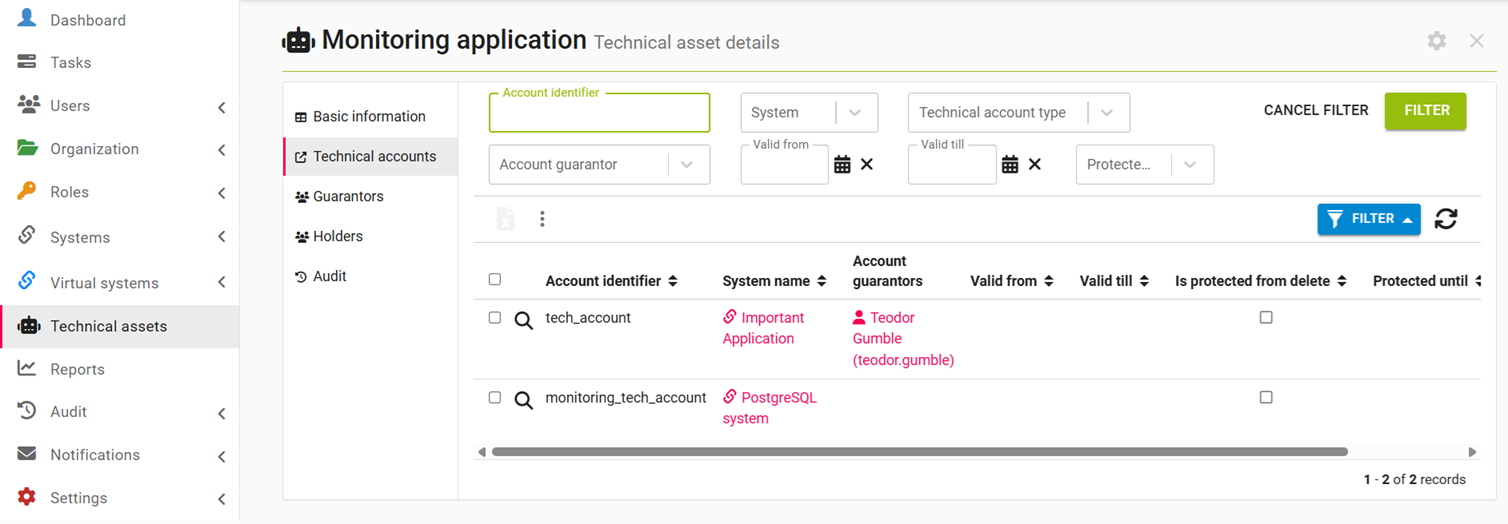
Table Columns
| Column | Description |
| Account identifier | Account identifier on the system |
| System name | Name of the system to which the technical account provides access |
| Account guarantors | Guarantors of the technical account, including those listed directly and those who are guarantors via an assigned guarantor role |
| Valid from | Start date of the technical account's validity |
| Valid till | End date of the technical account's validity |
| Is protected from delete | Flag indicating that the technical account is protected from deletion (it is in quarantine) |
| Protected untill | Date until which the technical account is protected from deletion (when the quarantine expires and the account will be deleted) |
Filters
| Filter | Description |
|---|---|
| Account identifier | Enables searching by technical account name; an exact match is required |
| System | Enables searching by the name of the system to which the technical account provides access. |
| Technical account type | Enables searching by system mapping |
| Account guarantor | Enables searching for technical accounts by guarantor (either direct or via a role) |
| Valid from | Enables searching for technical accounts with a specific validity start date |
| Valid till | Enables searching for technical accounts with a specific validity end date |
| Protected from deletion | Enables searching only for technical accounts that are in quarantine, or only for those that are not |
Bulk actions
| Bulk action | Description | Required permissions |
|---|---|---|
| Report | Basic export of technical accounts | always available |
Technical asset Guarantors
This sub-agenda allows you to manage the direct guarantors of the technical asset, as well as guarantor roles, the assignment of which makes a user a guarantor.
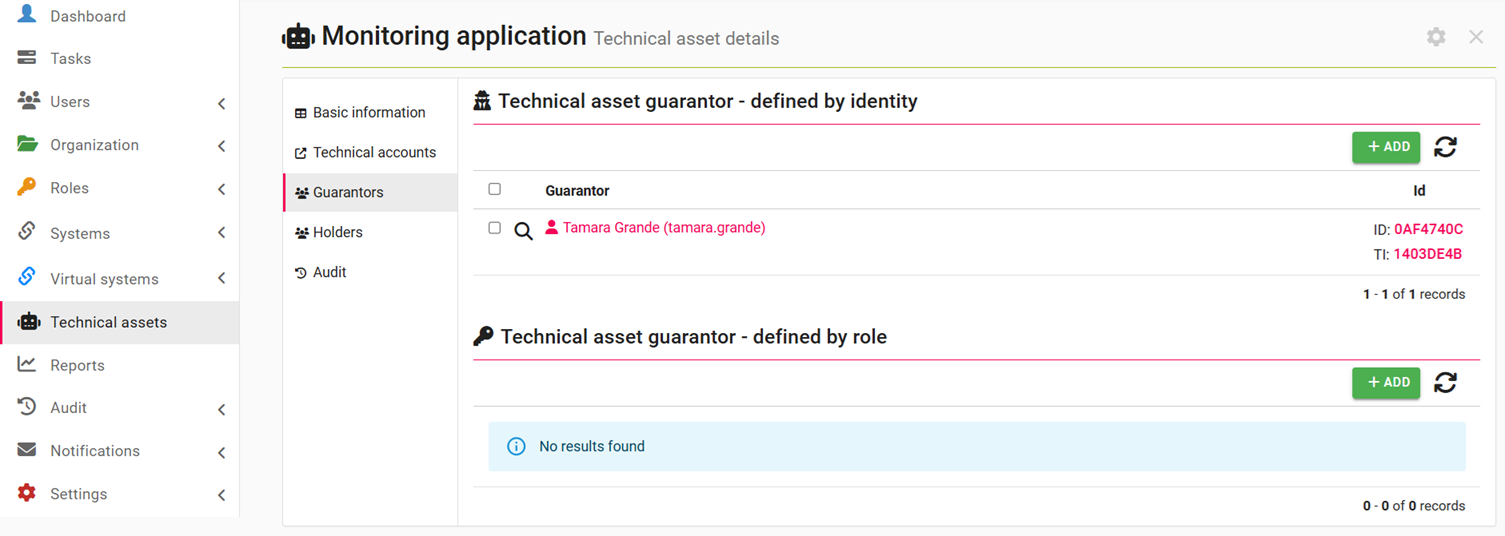
Technical asset Holders
This sub-agenda allows you to manage the direct holders of the technical asset, as well as holder roles, the assignment of which makes a user a holder.
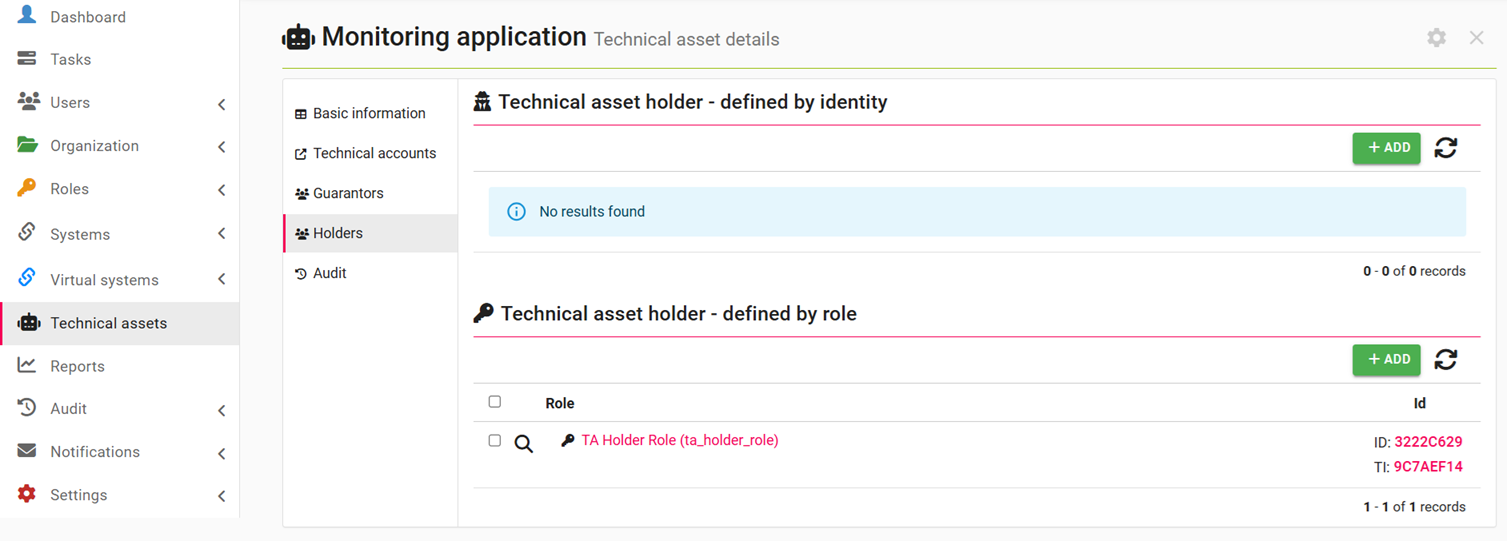
Technical asset Audit
This sub-agenda displays the audit log for the technical asset and its related entities.
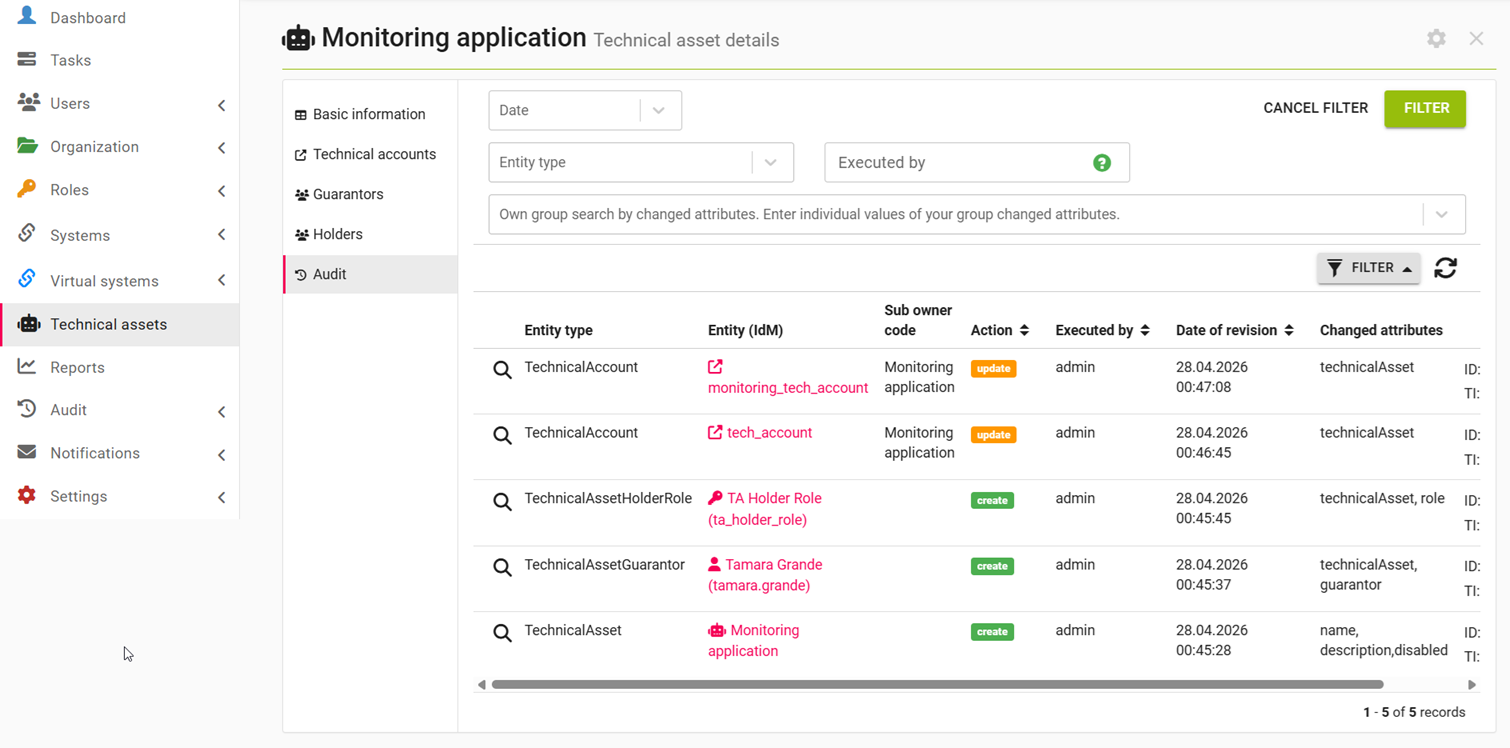
Table columns
| Column | Description |
|---|---|
| Entity type | Type of entity upon which the action was performed |
| Entity (IdM) | Entity upon which the action was performed |
| Sub owner code | Code of the secondary related entity |
| Action | Type of performed action |
| Executed by | Username of the user who performed the action |
| Date of revision | Date and time when the action was performed |
| Changed attributes | List of attributes changed during the action |
Filters
| Filter | Descriptin |
|---|---|
| Date | Enables searching for actions performed within a specific period |
| Entity type | Enables searching by the type of entity upon which the action was performed. |
| Executed by | Enables searching by the username of the user who performed the action; an exact match is required |
| Own group search by changed attributes | Enables searching for actions during which the given list of attributes was changed |
Bulk actions
The audit table has no bulk actions.
Technical asset guarantor and holder roles
To simplify permission setup, the techAssetGuarantorRole and techAssetHolderRole roles have been created, which grant permissions to guarantors and holders of technical roles. These roles can either be nested under userRole or assigned directly to selected users. Default permission settings:
| Feature | In guarantor role | In holder role |
| Read my technical assets | Yes | Yes |
| Edit my technical assets | Yes | No |
| Assign my technical assets to technical accounts | No | Yes |
| Read my technical asset guarantors - direct | Yes | Yes |
| Manage my technical asset guarantors - direct | Yes | No |
| Read my technical asset guarantors - by role | Yes | Yes |
| Manage my technical asset guarantors - by role | Yes | No |
| Read my technical asset holders - direct | Yes | Yes |
| Manage my technical asset holders - direct | Yes | No |
| Read my technical asset holders - by role | Yes | Yes |
| Manage my technical asset holders - by role | Yes | No |
| Read technical accounts under my technical assets | Yes | Yes |
| Edit technical accounts under my technical assets | No | Yes |
| Edit accounts on system related to technical accounts under my technical assets | No | Yes |
| Read roles assigned to technical accounts under my technical assets | Yes | Yes |
| Read role requests for technical accounts under my technical assets | Yes | Yes |
| Create role requests for technical accounts under my technical assets | No | Yes |