Table of Contents
Notification - the change of identity's contract
The LRT ContractChangeNotificationTask can send an email notification to holders of a specified role, managers, and the owner of the changed contract. The recipients of the notification can be modified in the LRT setup and the notification template can be modified as well.
The task will check changes in selected basic contract attributes and contract EAV attributes, and if a change is detected, the notification is sent.
Each notification can use a different notification template (and must use a different topic). No default topic is given so when configuring the task, you must always specify the topic. You can use the supplied stub (ContractChange) to help you configure your own template. Then you specify the topic: "extras:contractChange".
Template
You can create your own template by copying the stub. You have these objects available:
- userIdentity - full IdmIdentityDto
- user - full name as String
- department - department from tree node as String
- workPosition - the tree nodes where the user is located
- manager - full IdmIdentityDto of user's manager
- identityUrl - URL to user's dashboard
- identityEav - user's EAV as list of IdmFormInstanceDto
- identityEavMap - user's EAV as Map of name of EAV and it's value as String
- identityContract - user's contract as IdmIdentitycontractDto
- identityContractEav - user contract's EAV as list of IdmFormInstanceDto
- identityContractEavMap - user contracts's EAV as Map of name of EAV and it's value as String
- rolesAllNames - list of all user's roles as names, sorted alphabeticaly
- rolesAllDto - list of all user's roles as IdmRoleDto
- assignedRolesAllDto - list of all user's roles as IdmIdentityRoleDto
- rolesDirectNames - list of directly assigned user's roles as names
- rolesDirectDto - list of directly assigned user's roles as IdmRoleDto
- assignedRolesDirectDto - list of directly assigned user's roles as IdmIdentityRoleDto
- rolesSubrolesNames - list of user's roles assigned by business roles as names
- rolesSubrolesDto - list of user's roles assigned by business roles as IdmRoleDto
- assignedRolesSubrolesDto - list of user's roles assigned by business roles as IdmIdentityRoleDto
- rolesAutoNames - list of automaticly assigned user's roles as names
- rolesAutoDto - list of automaticly assigned user's roles as names
- assignedRolesAutoDto - list of automaticly assigned user's roles as names
- accounts - list of system that the user has an account on
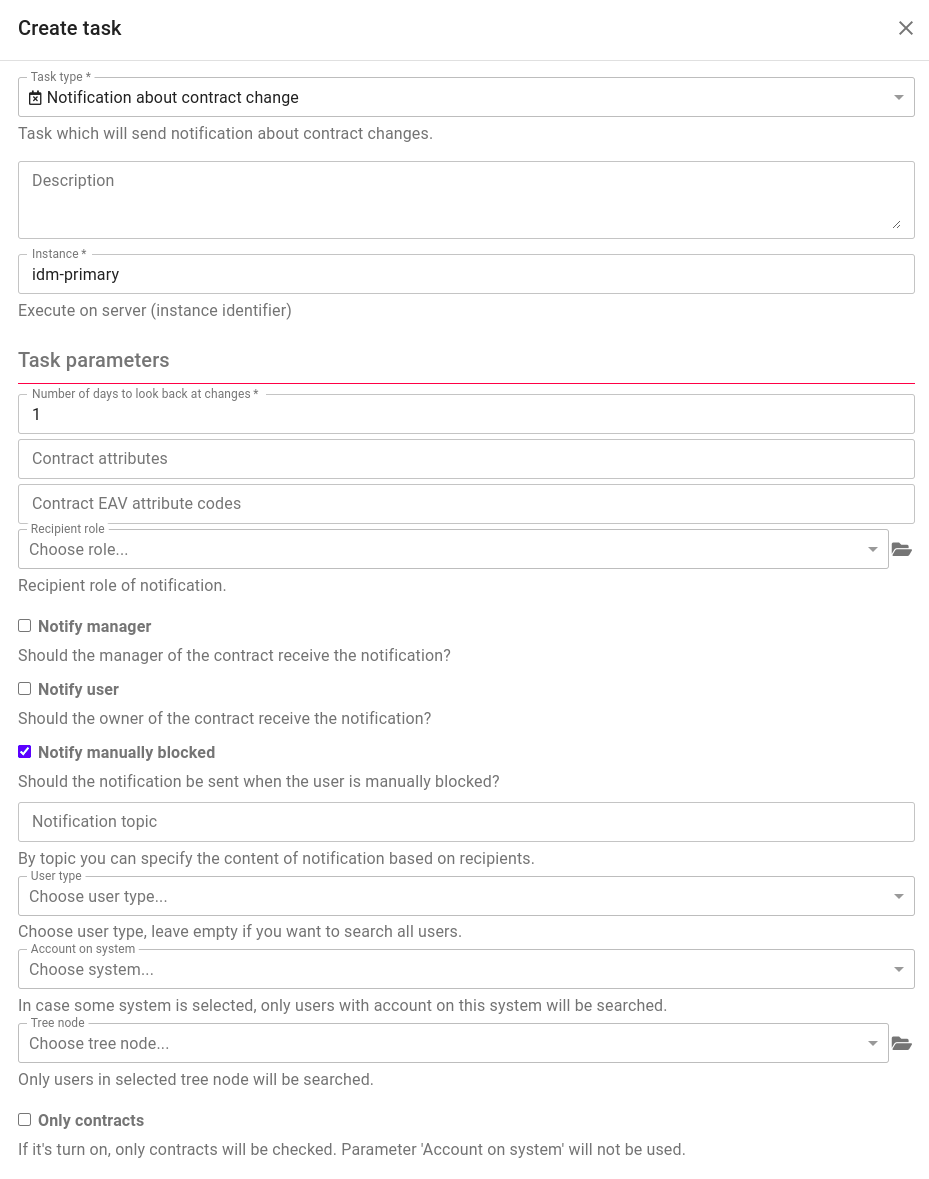
Configuration of LRT
 The example is missing the notification topic, for example "extras:contractChange".
The field "Contract attributes" uses comma (",") as a delimiter for separating attributes, even though the help line says it is a semicolon (this holds at least for version 14.0.0 and lower)
Basic contract attributes
You can use the following attribute codes for basic contract attributes.
- validFrom - the start of the contract's validity
- validTill - the end of the contract's validity
- workPosition - the org. unit the user contract is located on
- externe - is the contract for an externe employee
- description - contract description
- main - is the contract main
- disabled - is the contract disabled
- position - the name of the contracts position
- state - contract' state (disabled, excluded)
How to use variables in email templates
Methods that may be used for the objects:
IdmIdentityDto
- getUsername()
- getFirstName()
- getLastName()
- getPhone()
- getTitleBefore()
- getTitleAfter()
- getDescription()
- isDisabled()
- getState()
- getBlockLoginDate()
- getExternalCode() - personal number
- getFormProjection() - this is UUID of the user's type
IdmIdentityContractDto
- getIdentity()
- getValidFrom()
- getValidTill()
- getPosition() název kontraktu
- isDisabled()
- isExcluded()
- getWorkPosition() - position in the organization structure
- getDescription()
IdmRoleDto
- getCode()
- getName()
- isDisabled()
- getRoleType()
- getPriority()
- getDescription()
- getEnvironment()
- getBaseCode()
How can you work with the lists? Following example will iterate over the list of the directly assigned roles and writes each role name to a separate line:
#foreach ($directRole in $rolesDirectNames)

$directRole

<br />

#end
How can you work with the maps?
#foreach ($eav in $identityEavMap.entrySet())

Name is $eav.key and value is $eav.value

<br />

#end
Writing the name, last name and email of the manager:
$manager.getFirstName() $manager.getLastName() - $manager.getEmail()