Module of reports: SQL Universal report (installation guide)
This report will report an entire database table/view or data based on a custom SQL query.
Only a user with superadmin permission can execute this report

You have three options for running this report:
- Table/view name - reports all data from a table/view as it is in the database
- SQL query - reports data based on a custom SQL query
- Code list - reports data based on a custom SQL query prepared and stored in code list
Configuration for code list
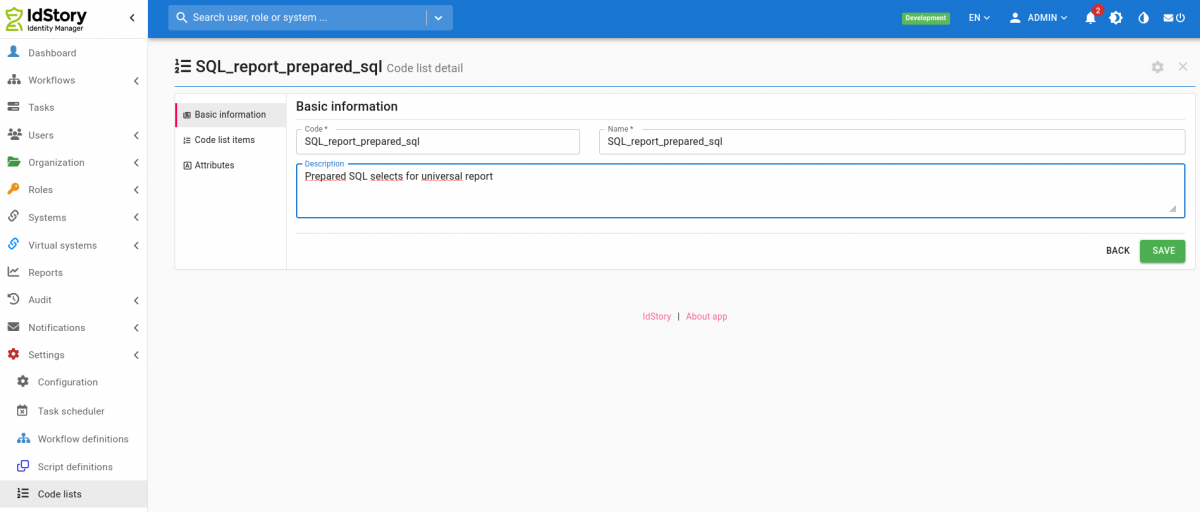
You need to create new code list with any code eg.: SQL_report_prepared_sql. Code of code list with queries is set in configuration property idm.sec.reports.sql.report.codelist.code (already exists with default value).
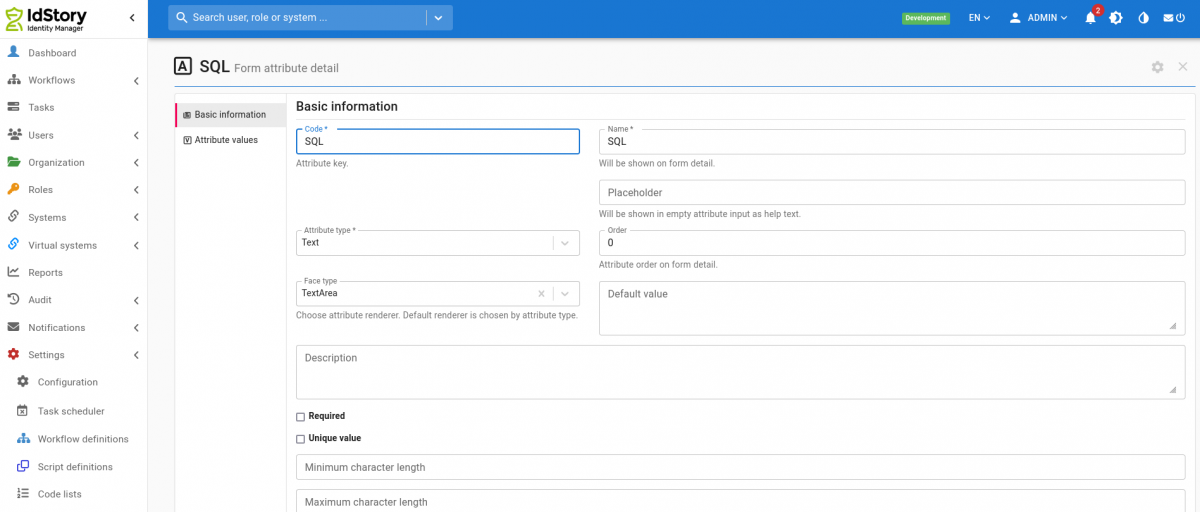
In code list create new attribute with name SQL, type Text and facetype TextArea. Code of attribute is set in configuration property idm.sec.reports.sql.report.codelist.eav.code (already exists with default value).
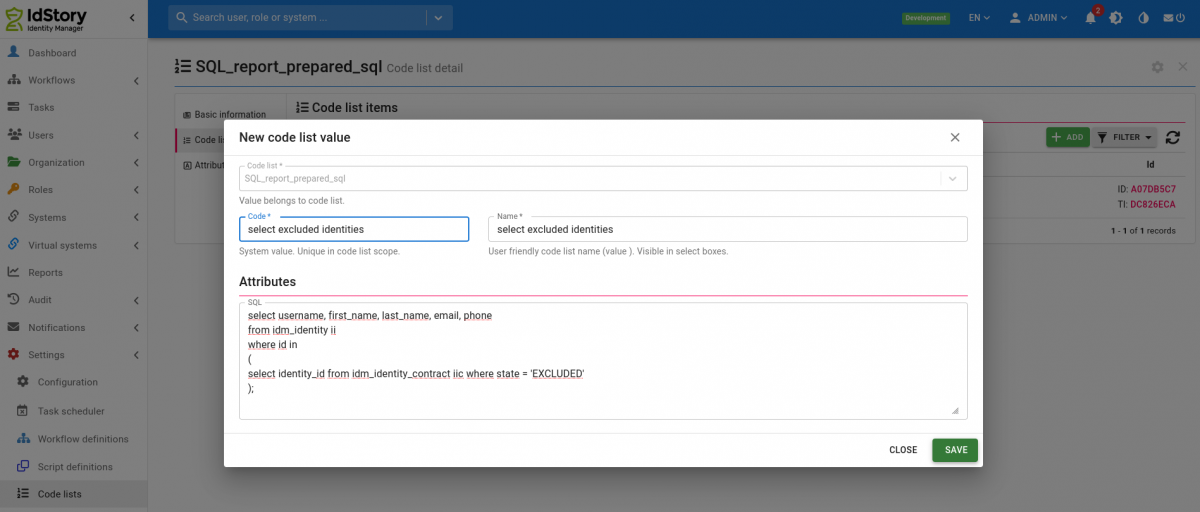
Create new item in code list. Code of item is identifier you select in report, in attribute SQL is prepared SQL for report.
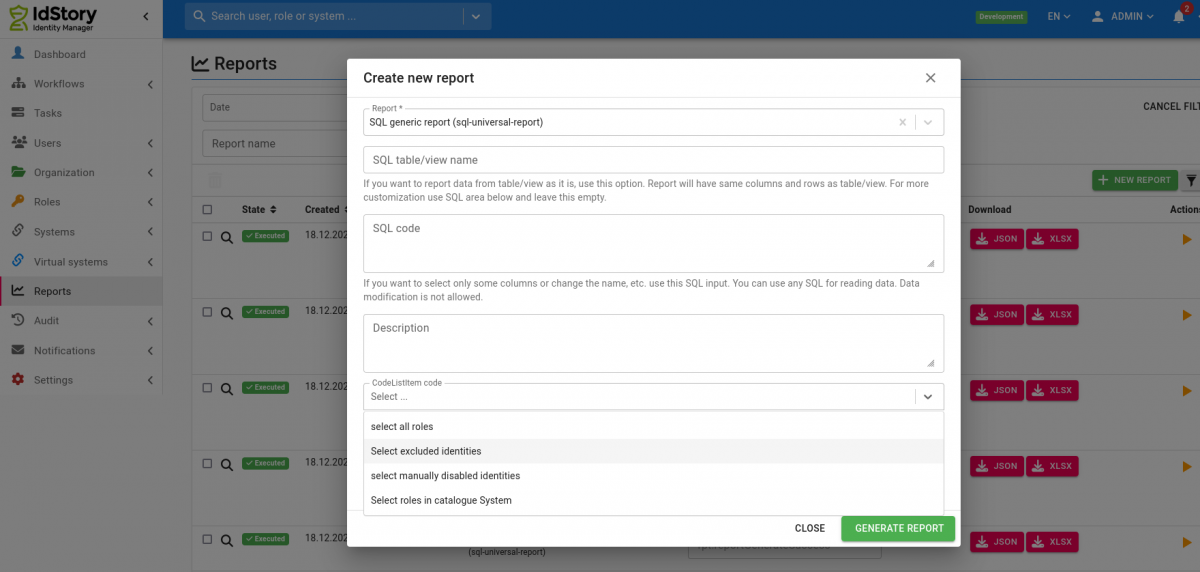
Now we can create report using prepared SQL from code list.
Mandatory config for classic installation
You need to configure an additional application.properties file. This report is using a separate datasource for safety reasons.
For example read only user for whole IdM database:
Turn off IdM and then execute:

CREATE USER czechidm_report PASSWORD '***some secure password***';
GRANT CONNECT ON DATABASE czechidm TO czechidm_report;

\c czechidm;

REVOKE ALL ON SCHEMA public FROM public;
GRANT USAGE ON SCHEMA public TO public;
GRANT ALL ON SCHEMA public TO czechidm;

GRANT SELECT ON ALL TABLES IN SCHEMA public TO czechidm_report;

ALTER DEFAULT PRIVILEGES FOR ROLE czechidm IN SCHEMA public
GRANT SELECT ON TABLES TO czechidm_report;

\q
The properties you need to configure are specified below.
# name of the database, update this
spring.reports-datasource.jdbcUrl=jdbc:postgresql://localhost:5432/hr
# name of the user, update this
spring.reports-datasource.username=czechidm_report
# password for the user, update this
spring.reports-datasource.password=keepass
spring.reports-datasource.driver-class-name=org.postgresql.Driver
spring.reports-datasource.testOnBorrow=true
spring.reports-datasource.validationQuery=SELECT 1
spring.reports-datasource.maximum-pool-size=5
spring.reports-datasource.read-only=true
Config for installation on IAM appliance
If you have IdM installed as IAM appliance, you have to follow the steps below in order to install and use the Reports module containing this report. Note that required version of CzechIdM container is at least 12.2.
Turn off IdM (this is neccessary because we will change DB permissions in the next steps):
systemctl stop iam-czechidm
Add the reports module to additional modules for your IdM installation:
cp idm-reports-3.0.0.jar /data/volumes/czechidm/modules/
Go to the internal database (you have to go inside the docker container and run psql inside) and create a separate user for running the SQL Universal report. For this report, always create a new user with only select permissions for the tables and views you need. Never use the same user you use for the standard IdM database. For example, a read only user for whole IdM database can be created as follows:
docker exec -it -u postgres czechidm-db psql

CREATE USER czechidm_report PASSWORD '***some secure password***';
GRANT CONNECT ON DATABASE czechidm TO czechidm_report;

\c czechidm;

REVOKE ALL ON SCHEMA public FROM public;
GRANT USAGE ON SCHEMA public TO public;
GRANT ALL ON SCHEMA public TO czechidm;

GRANT SELECT ON ALL TABLES IN SCHEMA public TO czechidm_report;

ALTER DEFAULT PRIVILEGES FOR ROLE czechidm IN SCHEMA public
GRANT SELECT ON TABLES TO czechidm_report;

\q
Back on the server (outside of the docker container), save the password of the user you just created to a separate file:
echo "***some secure password***"> /data/volumes/czechidm/secrets/idm_db_report.pwfile
Finally, update the definition of the iam-czechidm service in the file /data/registry/node-active-config/docker-compose-czechidm.yml:
# uncomment (i.e. remove hash from) the following lines in the "environment" section:
      - CZECHIDM_REPORTS_DB_URL=jdbc:postgresql://czechidm-db:5432/czechidm
      - CZECHIDM_REPORTS_DB_USER=czechidm_report
      - CZECHIDM_REPORTS_DB_PASSFILE=/run/secrets/db_report.pwfile
      - CZECHIDM_REPORTS_DB_DRIVERCLASS=org.postgresql.Driver

# add following new lines in the "volumes" section:

      - type: bind
        source: /data/volumes/czechidm/secrets/idm_db_report.pwfile
        target: /run/secrets/db_report.pwfile
        read_only: true
Start the IdM service:
systemctl start iam-czechidm
When IdM starts up (it will take several minutes), login as admin and go to the Settings → Modules. Find the line with the Reports module and click on the Activate button.
Example SQL queries
A simple list of collected SQL queries over the new IdM database.
Most frequently used tables
| Table | Data |
|---|---|
| idm_identity | Identities (users) |
| idm_identity_contract | Contracts of the identities |
| idm_contract_guarantee | Managers of contracts of the identities |
| idm_identity_role | Roles assigned on the contracts of the identities |
| idm_role | Roles |
| idm_tree_node | Organizational structure (for all structure types) |
| idm_tree_type | Organizational structure types |
| idm_form_definition | Form definitions |
| idm_form_attribute | Form attributes - definition of all EAVs for all entity types |
| idm_identity_form_value, idm_i_contract_form_value, idm_role_form_value, … | Values of EAVs for the given entity types |
Finding an object by UUID
We are looking for an object (here an event) by the UUID that is displayed in IdM as 02fdad6a-1113-4102-bc7d-90fe64c2ed16.
PostgreSQL:
SELECT * FROM idm_entity_event WHERE ID = uuid_send('02fdad6a-1113-4102-bc7d-90fe64c2ed16'::uuid);
MS SQL Server. The UUID needs to be modified for the command - remove the dashes and prepend "0x":
SELECT * FROM bcv_idm_storage.idm_entity_event WHERE ID = CONVERT(VARBINARY(MAX), '0x02fdad6a11134102bc7d90fe64c2ed16', 1)
Displaying the ID in the format shown in the GUI:
SELECT CAST(ENCODE(id, 'hex') AS UUID) FROM idm_entity_event;
Queries over synchronization
Extracting the list of identifiers for a given synchronization run.
-- I insert into system_mapping_id the UUID of the mapping for the synchronization I am interested in. The creator is displayed here because I identified a specific run by who started it; replace creator with another column or add another condition to the where clause so that you can identify the specific synchronization run
SELECT encode(transaction_id, 'hex')::uuid, creator FROM sys_sync_log WHERE synchronization_config_id = (SELECT sys_sync_config.id FROM sys_sync_config WHERE system_mapping_id = uuid_send('afb0af24-964f-406b-a5cf-e1fccf6c0911'::uuid))

-- I use the Transaction ID from your query here. This gives me the items for that one synchronization run. Extracting items in the UNLINKED or UNKNOWN state is done via a like query, there may be another/better way. So this returns all identifiers of items that are in the unlinked or unknown state
SELECT identification FROM sys_sync_item_log WHERE transaction_id = uuid_send('f47cfe6a-aa03-4a9c-9271-057bc1e173de'::uuid) AND (message LIKE '%UNLINKED%' OR message LIKE '%UNKNOWN%');
Extracting non-existing entities
This report serves as an overview of all accounts on connected systems that are not managed in IdM.
The report lists all records that are no older than one week. In IdM, some synchronizations often run regularly, so I have added a column with the name of the synchronization to the export, which you can use to filter further in SQL. For example, list only synchronizations that start with "Kontrolní synchronizace", etc.
SELECT  ssil.display_name,ssil.identification, ssal.sync_action,  CAST(SUBSTRING(CAST(ss.id AS text) FROM 3) AS uuid) AS system_id, ss."name" AS system_name,ssal.created AS DATE,ssc."name" AS synchronization_name FROM sys_sync_item_log ssil
LEFT JOIN sys_sync_log sync ON ssil.transaction_id = sync.transaction_id
LEFT JOIN sys_sync_action_log ssal ON ssil.sync_action_log_id  = ssal.id
LEFT JOIN sys_sync_config ssc  ON sync.synchronization_config_id  = ssc.id
LEFT JOIN sys_system_mapping ssm ON  ssc.system_mapping_id  = ssm.id
LEFT JOIN sys_schema_obj_class ssoc ON  ssm.object_class_id  = ssoc.id
LEFT JOIN sys_system ss  ON  ssoc.system_id  = ss.id
WHERE ssal.sync_action = 'MISSING_ENTITY' AND
EXTRACT(WEEK FROM ssal.created) = EXTRACT(WEEK FROM CURRENT_DATE)
AND EXTRACT(YEAR FROM ssal.created) = EXTRACT(YEAR FROM CURRENT_DATE)
ORDER BY ssil.display_name;
Queries over identities and accounts
Retrieving EAV attributes:
-- identity with EAV attributes vpnExpiration and sshExpiration of type Date
SELECT ii.username, ii.disabled, ifa.name, iifv.date_value FROM idm_identity_form_value iifv  JOIN idm_identity ii ON iifv.owner_id=ii.id JOIN idm_form_attribute ifa ON iifv.attribute_id = ifa.id AND ifa.name IN  ('vpnExpiration','sshExpiration') ORDER BY iifv.date_value

-- identity with EAV attribute mailType of type ShortText and value Exchange
SELECT ii.username, ii.disabled, ifa.name, iifv.short_text_value FROM idm_identity_form_value iifv  JOIN idm_identity ii ON iifv.owner_id=ii.id JOIN idm_form_attribute ifa ON iifv.attribute_id = ifa.id AND ifa.name IN  ('mailType') WHERE short_text_value='Exchange';

-- changes of the EAV attribute for contracts of a specific identity
SELECT created, short_text_value FROM idm_i_contract_form_value_a WHERE owner_id IN (SELECT iic.id FROM idm_identity_contract iic JOIN idm_identity ii ON iic.identity_id=ii.id WHERE ii.username='joe.doe');
List of accounts of an identity:
SELECT i.username, aca.created, aca.account_id, aa.id, aa.uid FROM idm_identity i LEFT JOIN acc_identity_account aca ON i.id=aca.identity_id LEFT JOIN acc_account aa ON aca.account_id=aa.id WHERE i.username='loginidentity';
List of system identifiers of accounts (entities on a system) on a specific system created from a certain time and the login of the identity to which they belong:
SELECT ii.username, sse.uid FROM sys_system_entity sse JOIN acc_account aa ON aa.system_entity_id=sse.id JOIN acc_identity_account aia ON aia.account_id=aa.id JOIN idm_identity ii ON aia.identity_id=ii.id WHERE sse.system_id='\x9e73326d94ca4f1ba115c8b85900b5bb' AND sse.created > '2020-01-27 00:00:00.000'
List of accounts in the provisioning queue (active operations):
SELECT spo.created, spo.result_state, sse.uid FROM sys_provisioning_operation spo JOIN sys_system_entity sse ON spo.system_entity_id=sse.id LIMIT 100;
List of identities that have more than one valid contract:
SELECT i.username FROM idm_identity i JOIN idm_identity_contract ic ON ic.identity_id=i.id AND (ic.valid_till IS NULL OR ic.valid_till > '2020-04-21' ) GROUP BY i.username HAVING COUNT(*) > 1;
Finding accounts that have no link via a role, are not in protected mode and are not accounts on the Vema system - instead of Vema, you need to add all source systems of identities to which provisioning does not occur: (ideally the result should be empty, unless additional or technical accounts are used in the environment)
SELECT aa.in_protection, ss.name, aa.uid FROM acc_identity_account aia JOIN acc_account aa ON aia.account_id=aa.id JOIN sys_system ss ON aa.system_id=ss.id WHERE ss.name NOT LIKE 'Vema%' AND identity_role_id IS NULL AND aa.in_protection = FALSE;
Consistency check of identity accounts - whether a link to an account is created for each assigned role (empty result = all OK, non-empty may be the case for future contracts, otherwise it indicates a potential inconsistency). (For older versions of IdM, the command may report that srs.create_acc_by_default does not exist; in that case, the line with this condition can be removed.)
SELECT i.username, i.state, r.name, ir.id AS identity_role_id, aca.account_id, ss.name AS systemname FROM idm_identity i
JOIN idm_identity_contract ic ON ic.identity_id=i.id
JOIN idm_identity_role ir ON ir.identity_contract_id=ic.id
JOIN idm_role r ON ir.role_id=r.id
LEFT JOIN sys_role_system srs ON srs.role_id=r.id
LEFT JOIN sys_system ss ON srs.system_id=ss.id
LEFT JOIN acc_identity_account aca ON i.id=aca.identity_id AND aca.identity_role_id=ir.id
WHERE aca.identity_role_id IS NULL AND srs.role_id IS NOT NULL
AND srs.create_acc_by_default=TRUE
ORDER BY i.username
Check for duplicate paired accounts - cases where an identity has more than one account paired on a single "MS AD - Users" system (this is typically a problem if the additional accounts functionality is not used):
SELECT i.username, i.external_code, i.state, CASE WHEN aa.uid=i.username THEN ifv.short_text_value ELSE NULL END AS eav_distinguishedName, aa.uid
FROM idm_identity i
LEFT JOIN acc_identity_account aca ON i.id=aca.identity_id
LEFT JOIN acc_account aa ON aca.account_id=aa.id
LEFT JOIN sys_system s ON aa.system_id=s.id
LEFT JOIN idm_identity_form_value ifv ON i.id=ifv.owner_id AND ifv.attribute_id= ( SELECT ifa.id FROM idm_form_attribute ifa JOIN idm_form_definition ifd ON ifa.definition_id=ifd.id WHERE ifa.code='distinguishedName' AND ifd.definition_type='eu.bcvsolutions.idm.core.model.entity.IdmIdentity')
WHERE s.name='MS AD - Users'
AND i.username IN ( SELECT i.username FROM idm_identity i LEFT JOIN acc_identity_account aca ON i.id=aca.identity_id LEFT JOIN acc_account aa ON aca.account_id=aa.id LEFT JOIN sys_system s ON aa.system_id=s.id WHERE s.name='MS AD - Users' GROUP BY i.username HAVING COUNT(*)> 1 AND COUNT(DISTINCT aa.uid)> 1)
ORDER BY i.username, aa.id;
Finding which identity is affected by an error during the recalculation of dirty flags for contract slices:
SELECT username FROM idm_identity WHERE id IN (SELECT identity_id FROM idm_contract_slice WHERE id IN (SELECT owner_id FROM idm_entity_state WHERE id = uuid_send('0c44b1b4-1277-4473-a57a-bd6538e5a0f1'::uuid)));
Queries over roles and attributes
Assigned roles and identities:
SELECT i.username, r.name, ir.valid_till FROM idm_identity i
JOIN idm_identity_contract ic ON ic.identity_id=i.id
JOIN idm_identity_role ir ON ir.identity_contract_id=ic.id
JOIN idm_role r ON ir.role_id=r.id
ORDER BY r.name, i.username
List of identities that do not have a specific role assigned (in the select: "Název role")
SELECT i.username FROM idm_identity i
JOIN idm_identity_contract ic ON ic.identity_id=i.id
LEFT JOIN idm_identity_role ir ON ir.identity_contract_id=ic.id AND ir.role_id IN (SELECT id FROM idm_role WHERE name ='Název role')
WHERE ir.id IS NULL
List of identities that have a specific role assigned (in the select: "Kód přidělené role") but do not have another role (in the select: "Kód NEpřidělené role"), together with information about the contract and the organizational placement.
SELECT i.username, i.email, i.state, ic.valid_from, ic.valid_till, itn.code, itn.name FROM idm_identity i
JOIN idm_identity_contract ic ON ic.identity_id=i.id
LEFT JOIN idm_tree_node itn ON ic.work_position_id=itn.id
LEFT JOIN idm_identity_role ir ON ir.identity_contract_id=ic.id AND ir.role_id IN (SELECT id FROM idm_role WHERE code ='Kód NEpřidělené role')
JOIN idm_identity_role ir2 ON ir2.identity_contract_id=ic.id AND ir2.role_id IN (SELECT id FROM idm_role WHERE code ='Kód přidělené role')
WHERE ir.id IS NULL AND ir2.id IS NOT NULL
Assigned roles, including information whether the role is assigned as an automatic role on an organization:
SELECT i.username, i.first_name, i.last_name, r.name nazevrole, ar.name AS automatickarole FROM idm_identity i
JOIN idm_identity_contract ic ON ic.identity_id=i.id
JOIN idm_identity_role ir ON ir.identity_contract_id=ic.id
JOIN idm_role r ON ir.role_id=r.id
LEFT JOIN idm_auto_role ar ON ir.automatic_role_id=ar.id
ORDER BY i.username, r.name
Values of role parameters with the code "amis_text" from the "roleParameters" definition:
SELECT * FROM idm_identity_role_form_value WHERE attribute_id IN (SELECT id FROM idm_form_attribute WHERE code='amis_text' AND definition_id IN (SELECT id FROM idm_form_definition WHERE code='roleParameters')) ;
"Duplicate" manually assigned roles across all roles of a user. These are not the classic duplicates on a single contract.
SELECT
    i.username,
    r.code
FROM
    idm_identity_role ir
JOIN idm_identity_contract ic ON
    ic.id = ir.identity_contract_id
JOIN idm_identity i ON
    i.id = ic.identity_id
JOIN idm_role r ON
    r.id = ir.role_id
WHERE
    1 < (
    SELECT
        COUNT(*)
    FROM
        idm_identity_role ir2
    JOIN idm_identity_contract ic2 ON
        ic2.id = ir2.identity_contract_id
    JOIN idm_identity i2 ON
        i2.id = ic2.identity_id
    WHERE
        ir2.role_id = ir.role_id
        AND i2.id = i.id)
    AND ir.automatic_role_id IS NULL
    AND ir.role_composition_id IS NULL;
Query to detect duplicates in assigned automatic roles - in case of an incorrect invocation of save, two recalculations may occur for one identity and both may assign the same role. Be careful when deleting these identity roles; also delete other links such as sub-roles or accounts.
SELECT
    *
FROM
    idm_identity_role ir
WHERE
    (
        SELECT COUNT(*)
    FROM
        idm_identity_role ir2
    WHERE
        ir.identity_contract_id = ir2.identity_contract_id
        AND ir2.automatic_role_id = ir.automatic_role_id) > 1;
Listing of all automatic roles by attributes and rules, on which attributes they are set: (role code, role name, automatic role name, attribute name in the automatic role rule, attribute type, value in the automatic role rule)
SELECT ir.code, ir.name, iar.name, iarar.attribute_name, iarar.type, iarar.value FROM idm_auto_role iar JOIN idm_role ir ON iar.role_id=ir.id JOIN idm_auto_role_attribute iara ON iar.id=iara.id JOIN idm_auto_role_att_rule iarar ON iara.id=iarar.auto_role_att_id ORDER BY ir.code
Listing of all automatic roles by organization (note: only automatic roles set directly on the given organization, does not take inheritance into account):
SELECT tn.code, r.code FROM idm_role_tree_node rtn JOIN idm_auto_role ar ON rtn.id=ar.id
JOIN idm_tree_node tn ON rtn.tree_node_id=tn.id
JOIN idm_role r ON ar.role_id=r.id
Listing of all automatic roles for an organization that it inherited from parent organizations (only roles inherited from parents - directly set roles see query above):
SELECT itn.code kdo_dedi, itnparents.code odkud_dedi, ir.code, irtn.recursion_type FROM idm_tree_node itn
JOIN idm_forest_index ifi ON ifi.content_id = itn.id
JOIN idm_forest_index ifiparents ON ifi.lft> ifiparents.lft AND ifi.rgt <ifiparents.rgt AND ifi.forest_tree_type=ifiparents.forest_tree_type
JOIN idm_tree_node itnparents ON ifiparents.content_id=itnparents.id
LEFT JOIN idm_role_tree_node irtn ON irtn.tree_node_id=itnparents.id AND irtn.recursion_type='DOWN'
LEFT JOIN idm_auto_role iar ON irtn.id=iar.id
LEFT JOIN idm_role ir ON iar.role_id=ir.id
WHERE ir.code IS NOT NULL AND itn.code='kód organizace, pro kterou mě zajímají zděděné role';
Finding all organizations that are leaves (have no more subordinate organizations) and at the same time have no automatic role:
SELECT tn.id, tn.code, tn.name FROM idm_tree_node tn WHERE tn.id NOT IN (SELECT tree_node_id FROM idm_role_tree_node) AND tn.id NOT IN (SELECT parent_id FROM idm_tree_node WHERE parent_id IS NOT NULL) ORDER BY tn.code
Finding whether any automatic role assignment by organization is missing (works only on automatic roles with the No-propagation strategy). Ideally, the result should be empty.
SELECT i.username, i.first_name, i.last_name, itn.code, ic.state, itn.name, ar.name nazevrole, ar.name AS automatickarole FROM idm_identity i
JOIN idm_identity_contract ic ON ic.identity_id=i.id AND (ic.valid_till IS NULL OR ic.valid_till > now()) AND (ic.state IS NULL OR ic.state != 'DISABLED')
JOIN idm_tree_node itn ON itn.id=ic.work_position_id
JOIN idm_role_tree_node irtn ON irtn.tree_node_id=itn.id
JOIN idm_auto_role ar ON irtn.id=ar.id LEFT JOIN idm_identity_role ir ON ir.automatic_role_id=irtn.id WHERE ir.id IS NULL;
Extracting the values and strategies that roles populate for a specific attribute on a specific system:
SELECT ir.code, ss.name, srsa.name, transform_script, strategy_type FROM sys_role_system_attribute srsa JOIN sys_role_system srs ON srsa.role_system_id=srs.id JOIN sys_system ss ON srs.system_id=ss.id JOIN idm_role ir ON ir.id=srs.role_id WHERE srsa.name = 'profiles' AND ss.name = 'Golem GCD Test Koop - operátoři' ORDER BY ir.code,ss.name, srsa.name;
Listing of the flags "Forward account management", "Automatically create accounts" and "Skip value if contract is excluded" for roles that correspond to AD groups placed in OU=Mail
SELECT r.name AS role_name, rs.forward_acm_enabled, rs.create_acc_by_default, rsa.skip_value_if_excluded, rsa.transform_script
FROM idm_role r
JOIN sys_role_system rs ON r.id=rs.role_id
JOIN sys_role_system_attribute rsa ON rs.id=rsa.role_system_id AND rsa.name='ldapGroups'
WHERE rsa.transform_script LIKE '%OU=Mail%'
Roles and permissions
List of roles with information about which permissions they grant: (but note that this does not show the contents of "Configuration" = evaluator_properties, because it is binary, but it may also contain important settings, e.g. the "Use permissions" option in IdentityContractByIdentityEvaluator)
SELECT ir.code, authorizable_type, base_permissions, evaluator_type, group_permission FROM idm_authorization_policy iap JOIN idm_role ir ON iap.role_id=ir.id ORDER BY ir.code, iap.authorizable_type
Queries over virtual systems
Accounts and their attributes in the AMIS virtual system:
SELECT vs.uid, ifa.code, vsfv.string_value FROM vs_account_form_value vsfv JOIN idm_form_attribute ifa ON vsfv.attribute_id=ifa.id JOIN idm_form_definition ifd ON ifa.definition_id=ifd.id AND ifd.name LIKE 'Virtual system for %AMIS%' JOIN vs_account vs ON vs.id=vsfv.owner_id ORDER BY vs.uid, ifa.code;
Whether the approval of requests by the implementer is set on virtual systems:
SELECT ss.name, ifd.code, ssfv.boolean_value FROM sys_system_form_value ssfv  JOIN sys_system ss ON ssfv.owner_id=ss.id
JOIN idm_form_attribute ifa ON ssfv.attribute_id = ifa.id AND ifa.code IN  ('requiredConfirmation')
JOIN idm_form_definition ifd ON ifa.definition_id=ifd.id
ORDER BY ss.name, ifd.code
Accounts and their attributes exported together on one line:
copy (select login, string_agg(hodnota, ';') from (SELECT vs.uid as login, ifa.code, string_agg(vsfv.string_value, ',') as hodnota FROM vs_account_form_value vsfv JOIN idm_form_attribute ifa ON vsfv.attribute_id=ifa.id JOIN idm_form_definition ifd ON ifa.definition_id=ifd.id AND ifd.name LIKE 'Virtual system for %HP%' JOIN vs_account vs ON vs.id=vsfv.owner_id group by vs.uid, ifa.code order by vs.uid,ifa.code) as test group by login) TO '/tmp/hpux_lepsi_export_2019-09-13.csv' CSV HEADER DELIMITER ';';
Accounts from a virtual system that are not paired with any identity:
SELECT uid FROM vs_account va JOIN sys_system ss ON va.system_id=ss.id WHERE ss.name='Exchange' AND va.uid NOT IN (SELECT uid FROM acc_account aa WHERE system_id IN (SELECT id FROM sys_system WHERE name='Exchange') AND aa.id IN (SELECT account_id FROM acc_identity_account));
Queries over events
Events are in two tables: idm_entity_event and idm_entity_state. The idm_entity_state table contains a record for an event once it has started being processed; not before that. However, the idm_entity_state table also contains other things that are not only related to events (e.g. dirty flags from contract slice synchronization), so be careful when deleting.
Listing of pending events caused by role assignment - identity and role:
SELECT i.username, r.name, ee.* FROM idm_entity_event ee
LEFT JOIN idm_identity_role ir ON ee.owner_id=ir.id
LEFT JOIN idm_role r ON ir.role_id=r.id
LEFT JOIN idm_identity_contract ic ON ir.identity_contract_id=ic.id
LEFT JOIN idm_identity i ON ic.identity_id=i.id
WHERE ee.result_state='CREATED' AND ee.owner_type='eu.bcvsolutions.idm.core.model.entity.IdmIdentityRole'
Queries over organizations
List of organizational nodes with the full path within the organizational tree and with one EAV:
SELECT itn.code, itn.name, eav.short_text_value AS eav_value, string_agg(itnparents.code,';' ORDER BY ifiparents.lft) AS parents_code_full_path, string_agg(itnparents.name,';' ORDER BY ifiparents.lft) AS parents_name_full_path
FROM idm_tree_node itn
LEFT JOIN idm_forest_index ifi ON ifi.content_id = itn.id
LEFT JOIN idm_forest_index ifiparents ON ifi.lft> ifiparents.lft AND ifi.rgt <ifiparents.rgt AND ifi.forest_tree_type=ifiparents.forest_tree_type
LEFT JOIN idm_tree_node itnparents ON ifiparents.content_id=itnparents.id
LEFT JOIN idm_tree_node_form_value eav ON eav.owner_id = itn.id AND eav.attribute_id IN (SELECT ifa.id FROM idm_form_attribute ifa JOIN idm_form_definition ifd ON ifa.definition_id=ifd.id WHERE ifa.code='zkratkaKlinky' AND ifd.definition_type='eu.bcvsolutions.idm.core.model.entity.IdmTreeNode')
GROUP BY itn.code, itn.name, eav.short_text_value;
List of other positions of an identity, including the type of organizational structure:
SELECT ii.username, itn.code, itn.name, itt.code AS typstruktury, icp.position FROM idm_contract_position icp
JOIN idm_identity_contract iic ON icp.identity_contract_id=iic.id
JOIN idm_identity ii ON iic.identity_id=ii.id
JOIN idm_tree_node itn ON icp.work_position_id=itn.id
JOIN idm_tree_type itt ON itn.tree_type_id=itt.id
WHERE ii.username='loginuzivatele'
Queries over contracts
List of user contracts that are duplicates (have no link or the same link to the organizational structure, the same state, the same valid_till)
SELECT i.username, ic.identity_id, ic.work_position_id, tn.code, ic.state, ic.valid_till, COUNT(*) num_duplicate_contracts, MIN(encode(ic.id, 'hex')) contract_to_save
FROM idm_identity_contract ic
JOIN idm_identity i ON ic.identity_id=i.id
LEFT JOIN idm_tree_node tn ON ic.work_position_id=tn.id
GROUP BY i.username, ic.identity_id, ic.work_position_id, tn.code, ic.state, ic.valid_till
HAVING COUNT(*)> 1;
Queries regarding transformation scripts
When I need to find out whether a Groovy script is used in some transformation to/from a system, this is not visible in the "Script usage" agenda, because in transformations the scripts are identified only by their codes.
Transformation scripts used in attribute mapping on a system:
SELECT transform_from_res_script, transform_to_res_script FROM sys_system_attribute_mapping WHERE transform_from_res_script IS NOT NULL OR transform_to_res_script IS NOT NULL;
-- Including identification of the system and the attribute name
SELECT ss.name, ssam.name,transform_from_res_script, transform_to_res_script FROM sys_system_attribute_mapping ssam JOIN sys_system_mapping AS ssm ON ssam.system_mapping_id=ssm.id JOIN sys_schema_obj_class ssoc ON ssm.object_class_id=ssoc.id JOIN sys_system AS ss ON ssoc.system_id=ss.id WHERE transform_from_res_script IS NOT NULL OR transform_to_res_script IS NOT NULL ORDER BY ss.name, ssam.name ;
Transformation scripts used in attribute mapping on a system - those that are in the script library:
SELECT name, SUBSTRING (transform_from_res_script FROM 'setScriptCode[^)]*') skriptz, SUBSTRING (transform_to_res_script FROM 'setScriptCode[^)]*') skriptdo FROM sys_system_attribute_mapping WHERE transform_from_res_script LIKE '%setScriptCode%' OR transform_to_res_script LIKE '%setScriptCode%' ORDER BY skriptz, skriptdo;
Transformation scripts used in roles:
SELECT transform_script FROM sys_role_system_attribute;
Transformation scripts used in roles, including information about the role:
SELECT ir.code, transform_script FROM sys_role_system_attribute srsa JOIN sys_role_system srs ON srsa.role_system_id=srs.id JOIN idm_role ir ON ir.id=srs.role_id ORDER BY ir.code
Queries/reports over audits
Report of arrivals and departures of identities over the last 30 days - i.e. changes of identity state in the last 30 days (and note that the query may theoretically contain extra records if several arrivals and departures were performed on a given identity in that period):
SELECT all_i.datum_zmeny_stavu, all_i.typ_zmeny, i.username, i.first_name, i.last_name, i.state, ic.valid_from, ic.valid_till, ic.position, iguar.username AS nadrizeny, tn.code AS kod_pozice, tn.name AS nazev_pozice, tnparent.code AS department_code, tnparent.name AS department_name, icfv.short_text_value AS misto_vykonu_prace
FROM  (
    SELECT i.id, to_timestamp(MAX(a.timestamp/1000)) AS datum_zmeny_stavu, 'Nastup' AS typ_zmeny
    FROM idm_audit a
    JOIN idm_identity i ON a.entity_id=i.id
    WHERE a.changed_attributes LIKE '%state%' AND i.state IN ('FUTURE_CONTRACT', 'VALID') AND to_timestamp(a.timestamp/1000)> NOW() - INTERVAL '30 days'
    GROUP BY i.id
    UNION
    SELECT i.id, to_timestamp(MAX(a.timestamp/1000)) AS datum_zmeny_stavu, 'Odchod' AS typ_zmeny
    FROM idm_audit a
    JOIN idm_identity i ON a.entity_id=i.id
    WHERE a.changed_attributes LIKE '%state%' AND i.state IN ('LEFT') AND to_timestamp(a.timestamp/1000)> NOW() - INTERVAL '30 days'
    GROUP BY i.id
) AS all_i
JOIN idm_identity i ON all_i.id=i.id
JOIN idm_identity_contract ic ON all_i.id=ic.identity_id
    AND ((all_i.typ_zmeny='Nastup' AND (ic.valid_till IS NULL OR ic.valid_till> now()) AND ic.state IS NULL)
        OR
        (all_i.typ_zmeny IN ('Odchod') AND (ic.valid_till <now() OR ic.state = 'DISABLED')))
LEFT JOIN idm_tree_node tn ON ic.work_position_id=tn.id
LEFT JOIN idm_tree_node tnparent ON tn.parent_id=tnparent.id
LEFT JOIN idm_i_contract_form_value icfv ON icfv.owner_id=ic.id AND icfv.attribute_id IN (SELECT id FROM idm_form_attribute WHERE code='misto_vykonu_prace')
LEFT JOIN idm_contract_guarantee cg ON cg.identity_contract_id=ic.id
LEFT JOIN idm_identity iguar ON iguar.id=cg.guarantee_id
ORDER BY i.username
TOKEN queries for identities
A useful query if you want to find out who is logged in.
SELECT
    t.id,
    t.created,
    t.expiration,
    t.issued_at,
    i.username
FROM
    idm_token t
LEFT JOIN idm_identity i ON
    i.id = owner_id
WHERE
    t.token_type = 'CIDMST'
    AND t.owner_type = 'eu.bcvsolutions.idm.core.model.entity.IdmIdentity'
ORDER BY
    created DESC;
Queries over the scheduler
The following SQL statement displays all scheduled tasks in the scheduler. If the execution is scheduled by time, it also displays this time (cron_expression). Note that it does not display scheduled executions chained after another task.
SELECT qjd.job_name, qjd.job_class_name, qjd.description, qt.trigger_type,  TO_timestamp(qt.start_time/1000) AS starttime, qct.cron_expression
FROM qrtz_job_details qjd
LEFT JOIN qrtz_triggers qt ON qjd.job_name=qt.job_name
LEFT JOIN qrtz_cron_triggers qct ON qt.trigger_name=qct.trigger_name;
The following SQL statement displays all records that are currently in the queue of a stateful task (e.g. HrEnableContractProcess):
SELECT pti.id, pti.created, pti.transaction_id, pti.result_code, pti.result_state, pti.referenced_dto_type, pti.referenced_entity_id,
ii.username, ii.first_name, ii.last_name, ii.external_code, ii.state AS identity_state, iic.valid_from, iic.valid_till, iic.state AS contract_state,
SUBSTRING(qjd.job_class_name FROM '[^\.]+$') AS task_name
FROM idm_processed_task_item pti
LEFT JOIN idm_scheduled_task ist ON pti.scheduled_task_queue_owner = ist.id LEFT JOIN qrtz_job_details qjd ON qjd.job_name=ist.quartz_task_name
LEFT JOIN idm_identity_contract iic ON pti.referenced_entity_id=iic.id
LEFT JOIN idm_identity ii ON iic.identity_id=ii.id
WHERE pti.scheduled_task_queue_owner IS NOT NULL
AND qjd.job_class_name LIKE '%HrEnableContractProcess'
ORDER BY pti.created DESC;
The following SQL statement displays all records that have historically been processed by some stateful task (e.g. HrEnableContractProcess) (this does not mean that they are still in the queue; they may also appear in the result multiple times):
SELECT pti.id, pti.created, pti.transaction_id, pti.result_code, pti.result_state, pti.referenced_dto_type, pti.referenced_entity_id,
ii.username, ii.first_name, ii.last_name, ii.external_code, ii.state AS identity_state, iic.valid_from, iic.valid_till, iic.state AS contract_state,
SUBSTRING(lrt.task_type FROM '[^\.]+$') AS task_name
FROM idm_processed_task_item pti
LEFT JOIN idm_long_running_task lrt ON lrt.id=pti.long_running_task
LEFT JOIN idm_identity_contract iic ON pti.referenced_entity_id=iic.id
LEFT JOIN idm_identity ii ON iic.identity_id=ii.id
WHERE pti.long_running_task IS NOT NULL
AND lrt.task_type LIKE '%HrEnableContractProcess'
ORDER BY pti.created DESC;
Queries over activity (workflow) tables
Information about deployed workflows
The first command contains a record of every upload of a new workflow version (both automatically and manually). The second command provides an overview of versions. Different workflows apparently generate IDs in different ways, which is strange, but it probably has no effect on functionality.
SELECT * FROM act_re_deployment ORDER BY deploy_time_;
SELECT id_, name_, rev_, key_, version_, resource_name_ FROM act_re_procdef ORDER BY key_;
Workflow approvers report
Finds out who and when approved a specific role for a specific user.
SELECT ii1.username AS username, v2.text_ AS role_name, v3.text_ AS decision, p.start_time_, p.end_time_, ii2.username AS approver
FROM idm_identity ii1
JOIN act_hi_varinst v1 ON uuid_send(v1.text_::uuid) = ii1.id AND v1.name_ = 'applicantIdentifier'
JOIN act_hi_procinst p ON p.id_ = v1.proc_inst_id_
JOIN act_hi_varinst v2 ON p.id_ = v2.proc_inst_id_ AND v2.name_ = 'processInstanceName'
LEFT JOIN act_hi_varinst v3 ON p.id_ = v3.proc_inst_id_ AND v3.name_ = 'decision'
LEFT JOIN act_hi_varinst v4 ON p.id_ = v4.proc_inst_id_ AND v4.name_ = 'implementerIdentifier'
LEFT JOIN act_hi_taskinst t ON t.proc_inst_id_ = p.id_
LEFT JOIN idm_identity ii2 ON uuid_send(t.assignee_::uuid) = ii2.id
WHERE ii1.username= 'jdoe' AND v2.text_ LIKE '%manager_obchod%';
Database structure
Listing of all tables and their columns and information about them.
SELECT * FROM information_schema.tables t JOIN information_schema.columns c ON c.table_name = t.table_name ORDER BY t.table_name, c.column_name;